How To Enable Comment Reply Option In Facebook " Profile "

3 comments

This is an awesome trick on Facebook 2014. In 2013, Facebook enabled Reply button in comments for both Facebook pages and Facebook profiles. But this reply button feature is applicable to profiles having more than 10,000 followers and later Facebook removed it too and now Facebook is giving reply button feature to only officially verified profiles. So now by following the below procedure, you can also get reply button for your Facebook profile posts.

  If you not understand what I'm telling you  for more details..


Requirements to get reply option for your Facebook Profile!

1. Google Chrome 28 version or earlier
2. Manual Geo location 
Extension

Let’s begin !! There 2 ways for this trick. So I'll describe one way first...

Step 1. Download Google Chrome 28 version & install it. ( 32.13 MB ) [ If you Google Chrome 28 version or earlier , ignore this step ] [after you click on download button , click 'Skip Ad' in top of right side after 5 seconds]


Step 2. Open touch.facebook.com and login through your email & password.

Step 3. Now Right click anywhere and click on inspect element

4. Now Click the Setting [gear]
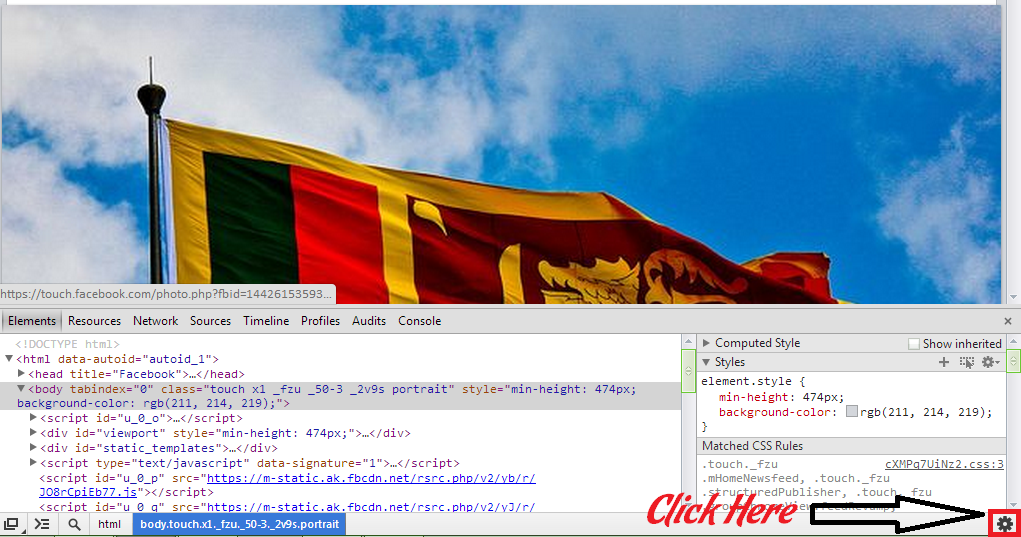

Step 5. Now Click " Overrides " & Check/Enable “ Override Geolocation ”. 
Type/Copy those number in the boxes : Lat = -41.289996 Lon = 174.781555 
Then Close setting window and KEEP the inspect element window open . See image below :


Step 7. Just open a new tab and open www.facebook.com

Step 8. Done now make a post... Enjoy!!

Second way get reply option for your Facebook Profile!


Step 1: Install the Manual Geo location Extension (plugin) to your Chrome Browser. To download this extension , [after you click on download button , click 'Skip Ad' in top of right side after 5 seconds]


 Then you will get a icon in your chrome browser.


Step 2: Open touch.facebook.com and login through your email & password.

Step 3: Now Right click anywhere and click on inspect element

4. Now Click the Setting [gear]

Step 4: Now Click " Overrides " & Check/Enable “ Override Geolocation ”. 


Then Close setting window and KEEP the inspect element window open . See image below :


Step 5: Just open the Geo location and then make it Enable and set your location to New Zealand , just add “ New Zealand ” in the search box and you have done! 


Step 6. Just open a new tab and open www.facebook.com


Step 7. Done now make a post... Enjoy!!


If you have any question then feel free to ask!


Ref_banner 468 Ref_banner 928x90

Read More »

Free Direct Download Top 10 Open Source PC Software In 2013. ( Bossie Awards 2013 )

4 comments

Today we use lot of Software to do many things. 
So , If we want Big Software with Big Company Names , we have to pay a big Money for it.
But , this is Technology World. So , we don't want buy a software.
we can use Open Source Software. It's Really 100% Free for Everyone !! :D


OK , Today we are going to tell you , Top 10 Desktop Computer Software In 2013.
Here is the Top 10 Desktop Computer Software In 2013. 
Download and Enjoy these Software !! :D
I get this Information & Software from Bossie Awards 2013.
So , Thank U Very Much Bossie Awards 2013.

* Before You Download These Software , Please Read That Considerable Note In Top Of This Page.

1. ) Google Chrome. ( Web Browser )


#. Free Download Google Chrome.

The world at large knows it as Google Chrome, but the open source world knows it as the Chromium Project. Google's experiment to create a better, faster, stronger browser served as the incubator for Google's V8 JavaScript engine (the core of Node.js) and the Blink rendering engine.

Omitting Google's branding and integration code, Chromium is not only popular with many security- and privacy-conscious folks, but is the version of the browser delivered in many Linux distributions. The project shows no sign of slowing down and has become the core of Chromium OS, Google's intriguing (if limited) attempt to deliver a Web-centric personal computing device.

2. ) Mozilla Firefox. ( Web Browser )

#. Free Download Mozilla Firefox.

Despite the continued success of Google Chrome, Mozilla Firefox remains a major influential force in the browser world, not least because of the project's unflagging devotion to the ideal of an open, nonproprietary Web. Each revision -- now rolled out monthly -- adds refinements to the browser's speed, security, support for HTML5, and platform-specific improvements. For example, as of Version 23, H.264 video decoding is accelerated in Windows via DirectX Video Acceleration 2. Firefox also sports more granular Do Not Track settings than Chrome does.

3. ) Apache Open Office. ( Office Software )

#. Free Download Apache Open Office 2013.


After OpenOffice passed into the hands of Sun, then Oracle, many feared that the free productivity suite was on its way to the boneyard. Happily, this turned out not to be the case, as OpenOffice 4.0 proved to be a solid step forward from its predecessors -- and a good sign that the Apache Foundation's stewardship was all for the better.

Among the biggest changes in 4.0 is a new properties and formatting sidebar, donated by IBM from its Lotus Symphony project (a now-defunct fork of OpenOffice). It's a thoughtful addition that can be tucked away with a click, and another heartening sign that the new custodians of the suite aren't going to change for change's sake.

4. ) Libre Office. ( Office Software )

#. Free Download Libre Office 2013.

Not everyone was willing to wait around for the OpenOffice project to right itself. For the disgruntled, the Document Foundation's LibreOffice project was quick to provide the solution. Aside from offering the GPLv2 licensing of the pre-Apache OpenOffice, LibreOffice also features a more regular release schedule (once every six months), unique usability tweaks, and many features and bug fixes ported from OpenOffice itself. For instance, you can enable OpenOffice 4.0's new sidebar in LibreOffice 4.1. Plug-ins written for one suite will generally work in the other, too.

5. ) Pidgin. ( Chating Software )

#. Free Download Pidgin Chat Client.


The Pidgin chat client is compatible with AIM, ICQ, Google Talk, Jabber/XMPP, MSN Messenger, Yahoo!, Bonjour, Gadu-Gadu, IRC, Lotus Sametime ... everything. It can run on Windows, Linux, and Unix natively. (For OS X, Pidgin recommends sister application Adium.) Pidgin supports buddy lists, file transfers, emoticons, away messages, and nearly 100 languages.


Lots of plug-ins are available as well -- for Facebook, Windows 7 Taskbar integration, text to speech, and audible alerts to name a few. Pidgin's voice and video support is limited to XMPP (Extensible Messaging and Presence Protocol) networks, so most people use it only for text chat and file transfer. Its biggest advantage is that it supports so many different proprietary chat networks all in the same application.

* Before You Download These Software , Please Read That Considerable Note In Top Of This Page.

6. ) Kee Pass. ( Password Generator Software )

#. Free Download Key Pass. ( Latest Version )

KeePass is a password manager that runs on Windows (and Mac OS X, Linux, and BSD systems running Mono). It stores passwords for all of your applications and websites in a single encrypted database, and lets you retrieve them with a single master password, or a key file stored on a floppy, CD, or USB stick -- or both. You can run KeePass itself from a USB stick and lock it to a Windows user account. Among other nice features, it will generate strong random passwords for you.

7. ) PDF Creator.

#. Free Download PDF Creator.

Creating PDF documents has traditionally required Adobe Acrobat, which is expensive for widespread use. Enter pdfcreator, an open source PDF print driver that " Prints " a PDF file from your favorite program such as Microsoft Word or Excel. It's as simple to use as a printer. Just select the PDF Creator virtual printer in your program's print window, tell it where to save the PDF file, and enter a file name.

8. ) Pea Zip. ( File Compressing Software )

#. Free Download Pea Zip. ( Latest Vesion )


PeaZip is an open source GUI application for file archive management. It's based on other open source technologies such as 7-Zip, FreeArc, and a variety of compression libraries.

Designed to function more like CD burner software than a traditional file archive program, PeaZip is easy for new users, while giving experienced users the options they want. It also supports more than 150 archives and compression algorithms, so it will open any archive file type you're likely to run into.

9. ) VLC. ( Media Player )

#. Free Download VLC Player. ( Latest Version ) 


The Swiss (well, French) Army knife of video, VLC can play just about any video format thrown at it, and on a variety of platforms that staggers the imagination. Even badly encoded files that crash other players can be unmangled by VLC. The program can even transcode files between formats or capture video from cameras or the desktop.

The project's emphasis on playing back video streams rather than files means that some file-specific functions found in other players, such as seeking back one keyframe, don't work with VLC's current decoding engine. It can also sometimes take a little guesswork to figure out how to do something, but the sheer  number of things VLC can do more than makes up for it.

10. ) Audacity. ( Music Editing Software )

#. Free Download Audacity. ( Latest Version )


Audacity is a multiplatform audio editor that can import and export in numerous formats, including WAV, AIFF, AU, FLAC (Free Lossless Audio Codec), and Ogg Vorbis. Useful to anyone who needs to manipulate audio, from amateur podcasters to professional musicians, it supports a large number of tracks and offers a large variety of special effects.

Audacity's editing features let you reduce noise and distortions, and the program has some of my favorite effects, including fades, wah wah, echo, and distortion. Another fun feature is the reverse effect, which allows you to play music backward just like Pink Floyd and the Beatles did in the '60s. Of course, back then all they had was four tracks and a thousand times more talent. 

So , this is Top 10 Desktop Computer Software In 2013. ( Bossie Awards 2013 ) :D

I think you must use these all software or these one of software.

But , if you don't use these Software , Download & use them Now !! :D Ref_banner 928x90

Read More »

Seven Net Joins With Android !! Get Your App Just Now !! :D

0 comments


Today I'm going to say about very special Android App. It's our Seven Net Android App. Now a days Android is a very famous OS. Most of our visitors are using Android Mobiles. But they still visit us by different kind of Internet Browsers like opera-mini , Uc  & Dolphin. So I decided to create an Android App for our Blog site. By this , you can visit us very quickly & safely!!

If you want to Download our Seven Net Android App , plz Click Here


After you install this App , it will look like this....


Read More »

Top 10 Most Expensive Smart Mobile Phones In The World Ever.

2 comments
I got this information form Click Top 10 Site. So , I must say Thank U Very Much to Click Top 10 Site.

Today we can't live without Computers , Internet , Mobile Phones & etc. So , these are main parts of Our daily Life.
I think u must Use one of these or these all. So , just think about you without a Computer , Internet , Mobile Phone or other device. 
What did you think ?? what did you feel ??
Yup , you are Correct. you can't live without these items.

What , You can !! OK , that's your discussion !!

OK , Today we are going to tell you , Top 10 Most Expensive Smart Mobile Phones ( Smart Phones ) in the Word ever.
Here is the Top 10 Most Expensive Smart Mobile Phones ( Smart Phones ) in the World. Rate and Enjoy these Smart Mobile Phones.

10 ) Ulysse Nardin’s The Chairman. ( $ 49,000 )


Ulysse Nardin is a Swiss watch manufacturer and the company has now manufactured an amazing smart phone worth 49,000 Dollars. The volume buttons are like an expensive watch and the crown between them also generates power for the phone. It is a touch and type phone with amazing looks.

9 ) Peter Aloisson’s Nokia Arte. ( $ 134,000 )


Nokia Arte’s features are already top of the line and when it is enhanced by Peter Alloisson, you can imagine how amazing it can become. It has a 3.15 MP camera and is encrusted by 680 white and pink diamonds. The body of the phone is made of solid gold which is 18 carats. Its price is $134,000.

8 ) Sony Ericsson Black Diamond. ( $ 300,000 )


Jaren Goh who is an industrial designer created this stylish concept for Sony. It features mirror detailing, polycarbonate mirror and an organic LED technology. Of course, when it comes to Sony, nobody can challenge the screen results. The phone is border-less and sleek. The price of this phone is $300,000.

7 ) Vertu Signature Cobra. ( $ 310,000 )


Boucheron is a French Jeweler who is the manufacturer of this phone. It is a limited edition and only 8 pieces are made. It has dual emeralds and 439 rubies on it that give it the shape of cobra. Its price is $310,000.

6 ) Gresso Luxor Las Vegas Jackpot. ( $ 1 Million )


Gresso was established in Switzerland in 2005. It is the manufacturer of luxury gadgets. This phone is made of solid gold weighing 180 grams. The back panel is made up of African backwoods that is more than 200 years old. The wood is the most expensive wood in the world. Its keys are made of sapphire crystal which is hand polished. Its price is $ 1 Million.

5 ) Goldvish Le Million. ( $ 1.2 Million )


Goldvish is a remarkable name in the manufacturing of the best and premium luxury phones. The company is proud of itself for applying Swiss craftsmanship to this technology. This company is also the creator of Le Million which has guaranteed that there will be limited production of only 3 units. The phone is studded with diamonds and solid gold. The phone is worth $ 1.2 Million.

4 ) JSC Ancort’s Diamond Crypto Smart Phone. ( $ 1.3 Million )


Based on Windows CE, this smart phone was developed by JSC Ancort. This is a Russian company. This phone here is engrossed with 50 Diamonds among which 10 a blue. It is worth 1.3 Million Dollars. Crypto is the name of this phone for the reason that it has an amazing encryption technology. It also gives protection against kidnapping and technological blackmail.

3 ) Peter Aloisson’s Kings Button iPhone. ( $ 2.4 Million )


The renowned jeweler from Austria Peter Aloisson is the creator of this phone. 138 diamonds are installed on this phone that makes it worth $ 2.4 Million. The beautiful White Diamond of 6.6 Carats serves as the home screen button which enhances the beauty of this phone.

2 ) Stuart Hughes’ Goldstriker iPhone 3G Supreme. ( $ 3.2 Million )


Hughes’ this iphone 3G is created with solid gold. Along with his partner Jo Emma Larvin, they create gadgets in which luxury and technology both are combined. This phone has more than 200 diamonds on it and the back panel is engrossed with 53 Rare Gems. The home button has a Diamond of 7 Carats and this phone is worth 3.2 Million Dollars.

1 ) Stuart Hughes’ iPhone Diamond Rose Edition. ( $ 8 Million ) 
[ Most Expensive Smart Phone In The World. ]


iPhone has its fans all over the world and so here comes the most expensive iPhone of the world. It doesn’t only have all the iPhone features but also is studded with diamonds of 100 carats. 53 diamonds enhance the beauty of the Apple logo and if these are not enough, it has a 7.4 Carat pink Diamond that is very Rare and is the home button of the phone. Its price is 8 Million Dollars.

So , this is a List of Top 10 Most Expensive Smart Mobile Phones In The World Ever. :D

What do you think about these Smart Phones ??

And , What would be your Smart Phone form these ?? :D :D
Ref_banner 928x90

Read More »

How To Add A Facebook Comment Box For Every Post Of Your Web Or Blog Sites.

0 comments

Now lot of people join to Web & Blog World. So , they try to Add something Special option to there Web or Blog Sites.

Now we are going to tell you , " How to add a Facebook Comment Box for your Every Post of your Web or Blog Sites. "
this is a Main part in your Web or Blog Sites. Because , If you add this Facebook Comment Box for your Web or Blog Sites , You can get Lot of Comment from your Web or Blog Readers.

We add this Facebook Comment Box to Our Site too.

In this Post we tell you How to add Facebook Comment Box for your Blogger Blog Sites.
But , If you have a Web Site , You can use this Methods. But , You must Customize some Steps.
I think you can Customize this , your self.

If you want to Add this Facebook Comment ox for your Web or Blog Sites , Follow this Steps.

  • First you have to Log in to Your Blogger & Click Templates In Left Side.
    • Take a Backup of the template first by clicking on Backup/Restore.
    • After you have taken a backup click EDIT HTML 
  • Copy the entire code and keep it in a Notepad temporarily in case something goes wrong and we need to replace quickly.
  • Press Ctrl + F & Type <head> & Press Enter Button.
  • Now you can see <head> and just after it paste the code.
    •  <meta content="FACEBOOK-APP-ID" property="fb:app_id" />
  •  If You Want To Find Facebook App ID , Do This.
    Go to this link - Facebook App ID Creator.
  • Now click ' Create New App ' in Top of Right Side.
  • [ If you haven't confirm your FB account via your Mobile Phone Number , When you click ' Create New App ' , you have to Type your Mobile Phone Number in that step & FB will send a Secret code to your Mobile Phone Number. Now , you have to Type that you received Secret Code in this step & Now you can Create New App. ( If you don't confirm your FB account via your Mobile Phone Number , you can't Create Facebook App ID. ) ]
  • Now Fill App Name using your Facebook Page Name. Fill App Namespace without Capital letters & symbols. Don't Do anything to Web Hosting. Now click Continue. [ Ex - App Name - Seven Net & App Namespace - sevennetsite ]
  • Fill Security Check with Correct Words & click Continue.
  • Now you can see your App ID below your App Name.
  • Fill Domain of your Site in App Domains. [ Ex - If your site is Blogger , your Domain is blogspot.com ]
  • Fill Your Site URL in Website with Facebook Login. [ Ex -  http://allsevennet.blogspot.com/ ] Be sure it starts with http:// and ends with this Symbol  / ) Now , Click '  Save Changes '.
  • Before you saw your App ID below your App Name. So , Now Copy Numbers of App ID & Replace in  FACEBOOK-APP-ID in that first code. 
  • Now press CTRL+F and find ,
    • * <div class='post-footer-line post-footer-line-3'>
    • OR <p class='post-footer-line post-footer-line-3'>
    • OR <data:post.body/>
  • Try finding any of the 3 above. ( This  <div class='post-footer-line post-footer-line-3'> Code is works 1000% Good. But , I Can't Say About Other 2 Codes. So , You Must Try that First Code.
  • And Paste the code Below right after it.
    • <b:if cond='data:blog.pageType == "item"'> <div id="fb-root"></div> <script>(function(d){ var js, id = 'facebook-jssdk'; if (d.getElementById(id)) {return;} js = d.createElement('script'); js.id = id; js.async = true; js.src = "//connect.facebook.net/en_US/all.js#xfbml=1"; d.getElementsByTagName('head')[0].appendChild(js); }(document));</script> <fb:comments width='600' colorscheme='light' expr:title='data:post.title' expr:href='data:post.canonicalUrl' expr:xid='data:post.id'/> </b:if>
  • Now Copy this below code. Again press Ctrl + F & Type <html> & Press Enter button. Now click after the <html> & Press Space button & Paste that code and Again press Space button.
    • xmlns:fb="https://www.facebook.com/2008/fbml"
  • Click ' Save Template '.
  • Click ' Back '.
  • Go & See Your Blog Post Below , Yup Yup !!
    There Are A Facebook Comment Box.


  • If You Can't Understand Anything , Please Watch This Video.  

    We Told You , How to Find Your Facebook App ID before this. Please , Read over this Video.


    • If this post Helpful for your Web or Blog Site , keep your Comment here.

Read More »

How To See Maximum Chatted or Messaged Facebook Friends & Count of Facebook Chats or Messages.

0 comments

Now lot of people use Social Networks in there Daily Life.
So , we can find lot of Social Network Site in the World. But , Facebook , Twitter , Google+ are Very popular in the World now.

Lot of people use this Facebook to find new Friends. So , they find a Best Friends , they chat with them in there Daily Life.
So , If u want to Find Maximum Chatted or Messaged Facebook Friends , You can use this Trick.

* First you have to click this Below Link. ( Link in the Below. )

* Now will Open a New Page.


1 - Now you can see Top 9 Maximum Chatted or Messaged Facebook Friends & Count of Chats or Messages in a Big Picture at Center of that page. 

( You can see this in Below Picture. )

2 - You can see All Facebook Chatted or Messaged Friends & Count of Chats or Messages.

( You can see this in Below Picture. )

[ If you can't see Picture Perfectly , Click on Picture. ]


If you Like this , Post your Comment.

Read More »

Free Direct Download Kaspersky Internet Security 2013 With Original Full License Key. ( Only 184MB - 100% Successful )

0 comments

Now I going to give you a Very Important thing.
It's Kaspersky Internet Security 2013 with Original Full License Key File. I know this is end of 2013 , But , still we have 3 Months to end this 2013 year.
So , If you haven't any Very Good Internet Security stiil , you can use this Kaspersky Internet Security 2013 for next 3 months.
After this 3 months , We will give you a Kaspersky Internet Security 2014 with Original Full License Key File.

I think now Lot of people know about Kaspersky. So , let's get Kaspersky Internet Security 2013 with Original Full License Key File.

This is only 184MB. Remember , this is not a Compressed file. this is a Original Setup.
We have to Direct Download & Install it to your Computer.

Ok , Now Click Below Link to Free Direct Download Kaspersky Internet Security 2013.

* Before You Download This , Please Read That Considerable Note In Top Of This Page.


* Click this Below Link to Free Direct Download Kaspersky Original Full License Key File.

* Before You Download This , Please Read That Considerable Note In Top Of This Page.

After you Click this Below Link , Stay only 5 Seconds & Click " Skip " in Top of the Right Side.
After you did it , automatically download this License Key File.
( You can learn " How to use this Key File " in below. )

#. Free Download 2013 Original Full License Key.

How to use Kaspersky Internet Security 2013 License Key File.

1. ) First you have to Install Kaspersky Internet Security 2013 Trail Version like a normal Software.

2. ) After that , Move your License Key File to your Desktop.

3. ) Now , Open Kaspersky Internet Security 2013 Trail Version & click  Licensing in bottom of right side.
[ If you Can't see this Picture Perfectly , Click On this Picture. ]


4. ) Now you can see Trail Key like this below picture. So , Now click that Little Cross front of that Trail Key.
[ If you Can't see this Picture Perfectly , Click On this Picture. ]


5. ) Now you can see a Message & click Delete key.
[ If you Can't see this Picture Perfectly , Click On this Picture. ]


6. ) Now , you have to some numbers.
So , type this number - 22222-22222-22222-2222U
( or you can Copy this numbers by using Ctrl + C & go to there and click on the First box and again press Ctrl + V. )
After you did this , click Next.
[ If you Can't see this Picture Perfectly , Click On this Picture. ]


7. ) Now , it will show you Application is not activated.
So , now click Activate the application.
[ If you Can't see this Picture Perfectly , Click On this Picture. ]


8. ) OK , this is our Final Mission !!

Now click Browse & Select your License Key File and click Open.
After , you did it , click Next.
[ If you Can't see this Picture Perfectly , Click On this Picture. ]


9. ) Now you have to wait few seconds to Complete this Loading.
After , it Perfectly loaded , click Finish.
[ If you Can't see this Picture Perfectly , Click On this Picture. ]


Now close your Kaspersky Internet Security 2013 & again Open.

you can Update this Perfectly. ( I took this below picture , when I Updating my Kaspersky Internet Security 2013. )
[ If you Can't see this Picture Perfectly , Click On this Picture. ]


Yes , Yes , Now you where Proud Owner of Original , Full Activated Kaspersky Internet Security 2013.

If you Like our this Post , Comment us.

Read More »

Tweet Now !!

Recommend us on Google!